Plugins
Plugin Marketplace
- DBAPI officially provides several commonly used plugins. You can download them from the Plugin Marketplace.
Functions of Plugins
- DBAPI plugins are categorized into five types: data transformation plugins, cache plugins, alert plugins, global data transformation plugins, and parameter processing plugins.
- All plugins are packaged as JAR files. To use them, place the JAR files in either the
extliborlibdirectory of DBAPI, then restart DBAPI.
Cache Plugin
- This plugin caches executor results. For example, for SQL executors, it caches query results to reduce frequent database queries and alleviate database load.
- The caching logic is implemented by the user, who can store data in Redis, MongoDB, Elasticsearch, or other systems.
- If no data is found in the cache, the executor runs and stores the result back into the cache.
Multi-SQL Scenarios with SQL Executors
When an SQL executor contains multiple SQL statements, the cache plugin encapsulates the results of all these SQL statements (if a single SQL statement has a transformation plugin configured, its result will be transformed first) into a single entity before caching it.
Alert Plugin
- When an API encounters an internal error, the alert plugin can send notifications—such as emails or SMS messages—to alert administrators.
- The alerting logic is defined by the user.
Data Transformation Plugin
- Sometimes, SQL queries cannot directly produce the desired data format. In such cases, using a data transformation plugin allows users to process and transform data more conveniently through custom code.
- For example, sensitive information like phone numbers or bank card numbers can be masked during SQL query execution.
Multi-SQL Scenarios with SQL Executors
If an SQL executor includes multiple SQL statements, each statement corresponds to its own data transformation plugin configuration. Each plugin processes only the results of a single SQL query.
Global Data Transformation Plugin
- By default, APIs return data in the format
{success:true,msg:xxx,data:xxx}. - In some cases, the response format needs to be modified—for instance, when the front-end low-code framework AMIS requires that API responses include a
statusfield. In such scenarios, theglobal data transformation plugincan be used to modify the entire API response format.
Difference Between Data Transformation Plugins and Global Data Transformation Plugins
A data transformation plugin modifies the output of an executor (e.g., transforming results from an SQL query), whereas a global data transformation plugin transforms the overall API response format.
Parameter Processing Plugin
- This plugin enables custom processing of request parameters.
- Examples include converting all request parameter values to uppercase, decrypting encrypted parameters according to user-defined logic, or adding an
offsetparameter to pagination queries based on the formula(pageNo - 1) * pageSize.
Version Support Information
Parameter processing plugins have been supported since version 4.0.16 in the Personal Edition and version 4.1.10 in the Enterprise Edition.
Plugin Development Process
Preparation
- Plugins are developed using Java. Ensure you have a Java (8+) development environment set up, create a Maven project, and add the
dbapi-plugindependency to yourpom.xmlfile:
<dependency>
    <groupId>com.gitee.freakchicken.dbapi</groupId>
    <artifactId>dbapi-plugin</artifactId>
    <version>4.0.16</version>
    <scope>provided</scope>
</dependency>
Plugin Development
Developing a Cache Plugin
- Create a new Java class implementing
com.gitee.freakchicken.dbapi.plugin.CachePlugin:
import com.gitee.freakchicken.dbapi.common.ApiConfig;
import com.gitee.freakchicken.dbapi.plugin.CachePlugin;

import java.util.Map;

public class Cdemo extends CachePlugin {

    /**
     * Plugin name, displayed on the UI to inform users.
     *
     * @return
     */
    @Override
    public String getName() {
        return null;
    }

    /**
     * Plugin description, displayed on the UI to inform users.
     *
     * @return
     */
    @Override
    public String getDescription() {
        return null;
    }

    /**
     * Plugin parameter description, displayed on the UI to inform users.
     *
     * @return
     */
    @Override
    public String getParamDescription() {
        return null;
    }

    /**
     * Initialization method, executed once when the plugin is instantiated,
     * typically used to set up connection pools.
     */
    @Override
    public void init() {

    }

    /**
     * Cache setting:
     *
     * @param config           API configuration
     * @param requestParams    request parameters
     * @param data             data to be cached
     * @param localPluginParam local plugin parameters
     */
    public void set(ApiConfig config, Map<String, Object> requestParams, Object data, String localPluginParam){

    }

    /**
     * Clear all cached data; triggered whenever the API is modified, deleted, or taken offline.
     *
     * @param config           API configuration
     * @param localPluginParam local plugin parameters
     */
    public void clean(ApiConfig config, String localPluginParam){

    }

    /**
     * Retrieve cached data:
     *
     * @param config           API configuration
     * @param requestParams    request parameters
     * @param localPluginParam local plugin parameters
     * @return
     */
    public Object get(ApiConfig config, Map<String, Object> requestParams, String localPluginParam){
        return null;
    }

}- The
init()method initializes the plugin and runs only once, often used to configure resources like Redis connection pools. - The
get()method retrieves cached data, taking API configuration and request parameters as inputs. - The
set()method stores data in the cache after an executor runs, accepting API configuration, request parameters, and the executor's result (or transformed result if a data transformation plugin is applied). - The
clean()method clears all cached data when the API is updated, deleted, or taken offline.
Developing a Data Transformation Plugin
- Create a new Java class implementing
com.gitee.freakchicken.dbapi.plugin.TransformPlugin:
import com.alibaba.fastjson.JSONObject;
import com.gitee.freakchicken.dbapi.common.ApiConfig;
import com.gitee.freakchicken.dbapi.plugin.TransformPlugin;

import java.util.List;

public class Tdemo extends TransformPlugin {

    /**
     * Plugin name, displayed on the UI to inform users.
     *
     * @return
     */
    @Override
    public String getName() {
        return null;
    }

    /**
     * Plugin description, displayed on the UI to inform users.
     *
     * @return
     */
    @Override
    public String getDescription() {
        return null;
    }

    /**
     * Plugin parameter description, displayed on the UI to inform users.
     *
     * @return
     */
    @Override
    public String getParamDescription() {
        return null;
    }

    /**
     * Initialization method, executed once when the plugin is instantiated.
     */
    public void init() {
    }

    /**
     * Data transformation logic:
     *
     * @param data             result returned after executor execution
     * @param localPluginParam local plugin parameters
     * @return
     */
    public Object transform(Object data, String localPluginParam) {
        return null;
    }
}- The transformation logic is written inside the
transform()method. - The first argument is the result of the executor; for SQL executors, this would be a
List<JSONObject>type, which can be casted accordingly. - The second argument is the local plugin parameter.
Developing a Global Data Transformation Plugin
- Create a new Java class implementing
com.gitee.freakchicken.dbapi.plugin.GlobalTransformPlugin:
import com.alibaba.fastjson.JSONObject;
import com.gitee.freakchicken.dbapi.common.ResponseDto;
import com.gitee.freakchicken.dbapi.plugin.GlobalTransformPlugin;

public class AmisGlobalTransformPlugin extends GlobalTransformPlugin {

    /**
     * Plugin name, displayed on the UI to inform users.
     *
     * @return
     */
    @Override
    public String getName() {
        return null;
    }

    /**
     * Plugin description, displayed on the UI to inform users.
     *
     * @return
     */
    @Override
    public String getDescription() {
        return null;
    }

    /**
     * Plugin parameter description, displayed on the UI to inform users.
     *
     * @return
     */
    @Override
    public String getParamDescription() {
        return null;
    }

    /**
     * Initialization method, executed once when the plugin is instantiated.
     */
    public void init() {
    }

    /**
     * Data transformation logic:
     *
     * @param data             API response data
     * @param localPluginParam global plugin parameters
     * @return
     */
    public Object transform(ResponseDto data, String localPluginParam) {
        return null;
    }

}- The transformation logic is written within the
transform()method, where the first argument is the API response data and the second is the global plugin parameters.
Developing an Alert Plugin
- Create a new Java class implementing
com.gitee.freakchicken.dbapi.plugin.AlarmPlugin:
import com.gitee.freakchicken.dbapi.common.ApiConfig;
import com.gitee.freakchicken.dbapi.plugin.AlarmPlugin;

import javax.servlet.http.HttpServletRequest;

public class EmailAlarmPlugin extends AlarmPlugin {

    /**
     * Plugin name, displayed on the UI to inform users.
     *
     * @return
     */
    @Override
    public String getName() {
        return null;
    }

    /**
     * Plugin description, displayed on the UI to inform users.
     *
     * @return
     */
    @Override
    public String getDescription() {
        return null;
    }

    /**
     * Plugin parameter description, displayed on the UI to inform users.
     *
     * @return
     */
    @Override
    public String getParamDescription() {
        return null;
    }

    /**
     * Initialization method, executed once when the plugin is instantiated.
     */
    @Override
    public void init() {

    }

    /**
     * Alert logic:
     *
     * @param e                exception
     * @param config           API metadata
     * @param request          request
     * @param localPluginParam local plugin parameters
     */
    public void alarm(Exception e, ApiConfig config, HttpServletRequest request, String localPluginParam) {

    }
}- The alert logic is written inside the
alarm()method.
Developing a Parameter Processing Plugin
- Create a new Java class that implements
com.gitee.freakchicken.dbapi.plugin.ParamProcessPlugin
import com.alibaba.fastjson.JSON;
import com.alibaba.fastjson.JSONObject;
import com.gitee.freakchicken.dbapi.common.ApiConfig;

import java.util.Map;

public class PaginationPlugin extends ParamProcessPlugin {
    /**
     * Plugin name, used to display on the page and provide user guidance.
     *
     * @return
     */
    @Override
    public String getName() {
        return null;
    }

    /**
     * Plugin description, used to display on the page and provide user guidance.
     *
     * @return
     */
    @Override
    public String getDescription() {
        return null;
    }

    /**
     * Description of plugin parameters, used to display on the page and provide user guidance.
     *
     * @return
     */
    @Override
    public String getParamDescription() {
        return null;
    }

    /**
     * Initialization method for the plugin, executed when the plugin is instantiated; it runs only once.
     */
    @Override
    public void init() {

    }

    /**
     * Parameter processing.
     *
     * @param requestParam     Request parameters
     * @param apiConfig        API metadata
     * @param localPluginParam Local parameters specific to this plugin
     */
    @Override
    public void process(Map<String, Object> requestParam, ApiConfig apiConfig, String localPluginParam) {

    }
}- The parameter-processing logic is written inside the
processmethod. requestParamrepresents the request parameters,apiConfigcontains the API metadata, andlocalPluginParamrefers to the plugin’s local parameters.
Plugin Registration
- DBAPI plugins are registered using Java's SPI mechanism. To do so, follow these steps:
Create a folder named
META-INFin theresourcesdirectory, then create a subfolder namedservicesinsideMETA-INF.In the
META-INF/servicesdirectory, create a file namedcom.gitee.freakchicken.dbapi.plugin.CachePlugin, and specify the fully qualified name of the cache plugin class you just wrote.Similarly, create files named
com.gitee.freakchicken.dbapi.plugin.TransformPlugin,com.gitee.freakchicken.dbapi.plugin.GlobalTransformPlugin,com.gitee.freakchicken.dbapi.plugin.AlarmPlugin, andcom.gitee.freakchicken.dbapi.plugin.ParamProcessPlugin, each containing the corresponding plugin class names.
Plugin Documentation
Global Parameters
- Purpose of global parameters: To enable easy reuse of a plugin across different environments.
- Global parameters are specific to each plugin and independent of APIs. For example, a cache plugin may require Redis IP address and port information, which can be configured in the
conf/plugin.propertiesfile. - These global settings facilitate switching between environments—for instance, testing and production—by allowing users to configure different Redis endpoints in the same configuration file.
- If you wish to add new global configurations, simply append them to the
conf/plugin.propertiesfile, such as:
RedisCachePlugin.ip=127.0.0.1
RedisCachePlugin.port=6379
RedisCachePlugin.db=0
RedisCachePlugin.password=- To retrieve global parameter values:
import com.gitee.freakchicken.dbapi.plugin.PluginConf;
String ip = PluginConf.getKey("RedisCachePlugin.ip");
Local Parameters
Purpose of local parameters: To allow flexible reuse of a plugin across multiple APIs.
Local parameters are defined individually for each API and specified via the UI during API creation or editing.
For example, with a Redis cache plugin, different APIs might need distinct cache durations. Each API calling the same cache plugin can pass its own time parameter.
Similarly, for a field encryption plugin, each API may require encrypting different fields. Thus, each API invoking the same field encryption plugin can supply its own field name parameter.
This approach enables a single plugin to be reused flexibly by various APIs.
To access local plugin parameters:
// Local parameters have already been passed into the relevant plugin method, with the parameter name being "localPluginParam".
// For example, in the alarm method of the alarm plugin, the last argument corresponds to the local plugin parameter.
public void alarm(Exception e, ApiConfig config, HttpServletRequest request, String localPluginParam) {

}
Logging Within Plugins
- When logging within a plugin, it is recommended to directly use the parent class's logger:
super.logger.debug("set data to cache");Plugin Descriptions
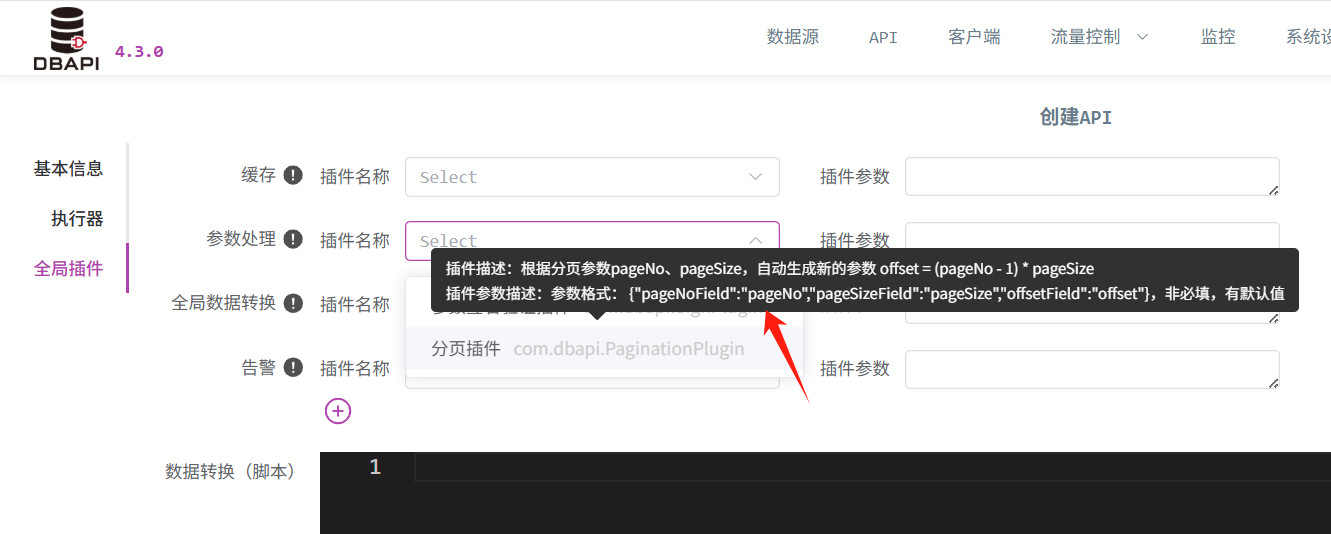
- All plugins must implement three methods:
getName,getDescription, andgetParamDescription. These serve to clearly communicate the plugin's purpose and the format of its local parameters on the UI.
Using Plugins
- After developing a plugin, package it and copy both the resulting JAR file and any dependent JARs into either the
extliborlibdirectory of DBAPI (we recommend placing them inextlibfor easier centralized management). Then restart the DBAPI service. (In cluster mode, ensure every node copies the JAR and restarts the cluster). - If your plugin uses global parameters, also add the corresponding configuration to
conf/plugin.propertiesand restart the service to apply changes. (In cluster mode, each node must update its configuration and restart accordingly).