DBAPI MCP Feature Overview: Turning Your Data APIs into AI Agent Tools
What is MCP?
MCP (Model Context Protocol) is an open standard protocol proposed and open-sourced by Anthropic. It defines how AI models interact with external tools and data sources, akin to a "USB-C port for the AI world"—through a unified protocol specification, any service implementing MCP can seamlessly integrate with various AI clients and frameworks.
DBAPI Enterprise Edition 4.5.0 officially includes MCP Server capabilities. You can map your already published APIs in DBAPI to MCP tools with a single click, making them discoverable and callable by AI clients.
What Problems Does MCP Solve?
In enterprise data applications, AI often needs to access databases, query business data, and invoke internal services. Traditionally, this requires developing separate interfaces and integration code for each scenario, resulting in low efficiency and high maintenance costs.
DBAPI’s MCP feature addresses these issues by:
- Zero-code integration: No need to write any AI integration code—existing APIs in DBAPI automatically become callable tools for AI.
- Unified management: All data tools are centrally managed in the DBAPI backend, with out-of-the-box support for permissions, rate limiting, and monitoring.
- Open ecosystem: Supports mainstream AI clients and frameworks such as Claude Desktop, Cursor, LangChain, and Spring AI.
- Enterprise security: Private APIs use token-based authentication, with fine-grained access control.
How It Works
AI Client / AI Framework (Claude Desktop / Cursor / LangChain / Spring AI)
        │ MCP Protocol (Streamable HTTP)
        ▼
  DBApi MCP Server (Port 8526)
        │ HTTP Calls
        ▼
  DBApi Backend (Port 8520 / Gateway)
        │
        ▼
      Database / Elasticsearch / Third-party APIs
The MCP Server acts as a bridge, registering APIs published by the DBAPI backend as MCP tools. AI clients discover the tool list via the standard MCP protocol and initiate calls; the MCP Server forwards these requests to the DBAPI backend for execution, returning the results to the AI client.
Quick Start
Prerequisites
- DBAPI Enterprise Edition 4.5.0 or later
- The DBAPI backend is running (default address:
http://127.0.0.1:8520) - At least one API has been created and published
Starting the MCP Server
# 1. Edit the configuration file
vim mcp/mcp-config.yaml

# 2. Start the MCP service
bash bin/dbapi-mcp.sh start
Publishing APIs to MCP
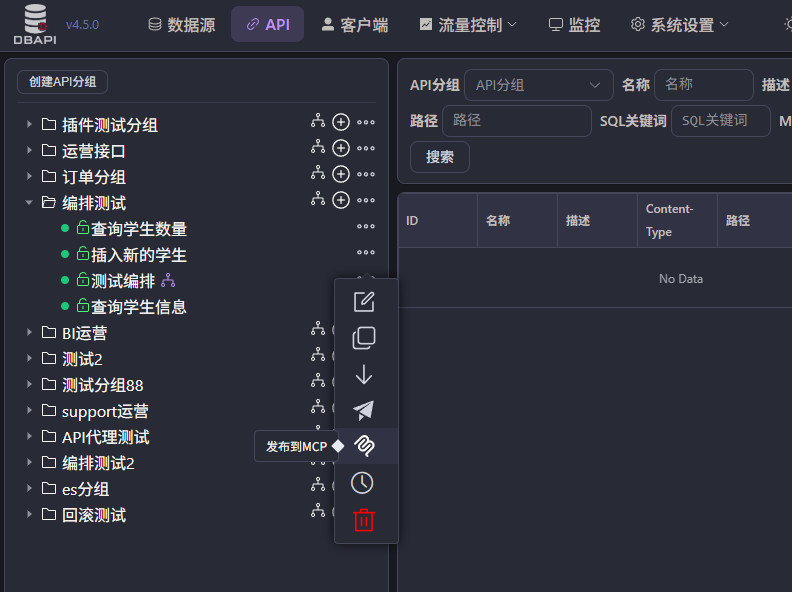
Only APIs that are already online and have the MCP switch enabled will be exposed as MCP tools.
- Log in to the DBAPI admin console.
- Go to the API management page.
- Locate the target API and click the MCP Switch in the action bar.
- After enabling it, the MCP Server will automatically synchronize during the next refresh cycle.
Calling MCP Tools
MCP endpoint address: http://<MCP_SERVER_HOST>:8526/mcp
Get the tool list:
curl http://localhost:8526/mcp \
  -H "Content-Type: application/json" \
  -d '{"jsonrpc":"2.0","id":1,"method":"tools/list"}'
Call a tool:
curl http://localhost:8526/mcp \
  -H "Content-Type: application/json" \
  -H "Authorization: YOUR_BUSINESS_TOKEN" \
  -d '{"jsonrpc":"2.0","id":2,"method":"tools/call","params":{"name":"dbapi_xxxx","arguments":{"key":"value"}}}'
Integrating with AI Clients
DBAPI’s MCP Server uses the Streamable HTTP protocol. Most clients (Claude Desktop, Codex CLI, Cursor, LangChain, Spring AI) automatically use Streamable HTTP based on the URL; OpenClaw requires explicit specification of
transport: "streamable-http".
Claude Desktop
Edit the configuration file (~/Library/Application Support/Claude/claude_desktop_config.json or %APPDATA%\Claude\claude_desktop_config.json):
{
  "mcpServers": {
    "dbapi": {
      "url": "http://localhost:8526/mcp"
    }
  }
}
Codex CLI
OpenAI Codex CLI supports MCP protocol’s Streamable HTTP transport. Add via CLI command:
codex mcp add dbapi --url http://localhost:8526/mcpAlternatively, edit ~/.codex/config.toml directly:
[mcp_servers.dbapi]
transport = { type = "streamable_http", url = "http://localhost:8526/mcp" }
enabled = true
For private APIs requiring a token, use env_http_headers to read from environment variables:
export DBAPI_TOKEN=your_token_here
codex mcp add dbapi --url http://localhost:8526/mcp[mcp_servers.dbapi]
transport = { type = "streamable_http", url = "http://localhost:8526/mcp" }
env_http_headers = { "Authorization" = "DBAPI_TOKEN" }
enabled = trueOpenClaw
As an AI agent platform, OpenClaw supports connecting to MCP servers. Configure via the openclaw mcp set command:
openclaw mcp set dbapi '{"url":"http://localhost:8526/mcp","transport":"streamable-http"}'Or add to the configuration file:
{
  "mcp": {
    "servers": {
      "dbapi": {
        "url": "http://localhost:8526/mcp",
        "transport": "streamable-http"
      }
    }
  }
}
For private APIs requiring a token, include headers:
openclaw mcp set dbapi '{"url":"http://localhost:8526/mcp","transport":"streamable-http","headers":{"Authorization":"YOUR_TOKEN"}}'Cursor
Edit .cursor/mcp.json:
{
  "mcpServers": {
    "dbapi": {
      "url": "http://localhost:8526/mcp",
      "headers": {
        "Authorization": "YOUR_BUSINESS_TOKEN"
      }
    }
  }
}
LangChain
LangChain provides native MCP client support through MCPAdapt, allowing easy connection:
from langchain_mcp_adapters.client import MCPClient

async with MCPClient("http://localhost:8526/mcp") as client:
    tools = await client.list_tools()
    result = await client.call_tool("dbapi_xxxx", {"key": "value"})
Spring AI
Spring AI supports MCP via the mcp-client-webmvc module:
McpClient client = McpClient.sync(new HttpMcpTransport("http://localhost:8526/mcp"));
List<Tool> tools = client.listTools();
client.callTool("dbapi_xxxx", Map.of("key", "value"));
Authentication Mechanisms
| API Type | Description | Token Required? |
|---|---|---|
| Public API | Accessible to anyone | No |
| Private API | Accessible only to authorized clients | Yes, included in headers.Authorization |
Obtaining a Token
# Obtain clientId and secret (created in the backend client management)
curl "http://localhost:8520/token/generate?clientId=YOUR_CLIENT_ID&secret=YOUR_CLIENT_SECRET"
Insert the returned token into the headers.Authorization field of the MCP client.
Tokens expire after a certain period; re-obtain if expired. You can configure longer expiration times in the client management settings to avoid frequent updates.
Enterprise Use Cases
Use Case 1: Natural Language Query Assistant
After publishing database query APIs as MCP tools, business users can directly ask questions in natural language via Claude Desktop:
"What were the top 10 products by sales revenue in East China last month?"
The AI automatically invokes the corresponding data query API in DBAPI, returns results, and presents them in natural language—no SQL knowledge required, no need to log into business systems.
Use Case 2: Intelligent Report Generation
By orchestrating multiple data queries into a complete reporting interface and publishing it as an MCP tool, AI clients can generate structured data analysis reports automatically.
Use Case 3: Data Anomaly Detection Agent
Register data-monitoring APIs as tools for LangChain agents. Agents run scheduled tasks to inspect business data, and when anomalies are detected, they push alerts via DingTalk or Feishu bots.
Use Case 4: Enhanced Corporate Knowledge Base
Publish internal system data query APIs (order inquiries, customer information, inventory status, etc.) as MCP tools, integrating them into enterprise-built AI assistants, enabling real-time access to corporate data.
Important Notes
- The MCP Server listens on port 8526 by default; modify this in
mcp-config.yaml. - Only APIs that are online and have the MCP switch enabled will be exposed.
- After modifying an API, the MCP Server automatically synchronizes metadata such as URLs and parameter definitions—no need to restart the MCP Server.
- DBAPI already features a comprehensive API authentication system (token-based authentication, client authorization) and IP firewall rules. MCP clients inherit these security measures without additional configuration.
- If using private APIs, ensure the client has obtained proper authorization for those APIs.
Version Requirement: DBAPI Enterprise Edition 4.5.0 or later supports MCP functionality.